Google Puts Gemini-Powered Search One Shortcut Away on Windows
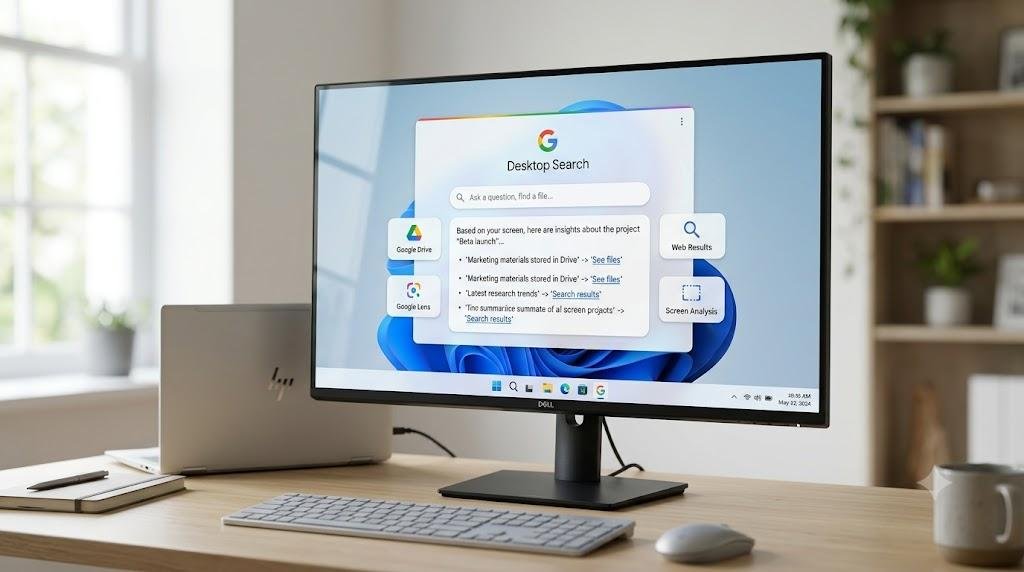
Google has expanded its AI-powered search experience to Windows desktops with the global rollout of its Google app for desktop, giving users a way to access AI Mode, web search, local files, Google Drive, and screen-based searches without opening a browser first.
The application became available globally in English on April 14, 2026, according to Google. It works on Windows 10 and newer versions of the operating system and can be launched from anywhere using the Alt + Space keyboard shortcut.
Despite descriptions of the rollout as bringing Gemini to Windows, there is an important distinction: Google has not released a dedicated native Gemini chat application for Windows equivalent to its Gemini app for Mac. Instead, Gemini-powered AI features are integrated into Google’s desktop search application.
AI Mode comes directly from the Windows desktop
The Google app for desktop is built around a search box that appears when users press Alt + Space.
From there, users can search the web, find files and applications stored on their computer, search Google Drive, and ask questions using Google’s AI Mode. Google says AI Mode provides AI-powered responses along with links to relevant information on the web.
The approach gives Google a way to put its AI capabilities closer to the Windows desktop without requiring users to switch to a browser tab.
The company first introduced the Windows application as an experimental Labs product in September 2025. At the time, Google described it as a way to search computer files, installed applications, Google Drive and the web from an Alt + Space interface. Google Lens and AI Mode were also part of the experiment.
The upgraded version is now available globally in English.
Users can ask about what’s on their screen
One of the more notable features is screen-based search.
Google says users can share either a specific window or their entire screen with the application and ask questions about what they are viewing. That could allow the app to provide information about a document, webpage, or other material currently displayed on the desktop.
Google Lens is also integrated into the experience. Users can select content on their screen and search for it, including text and images. Google specifically points to uses such as translating text and getting help with homework problems.
The result is closer to an always-available search and AI utility than a traditional desktop chatbot.
Google app is different from Gemini for Mac
The Windows launch has to be separated from Google’s standalone Gemini application for macOS.
Google introduced the native Gemini app for Mac in April 2026, describing it as a dedicated desktop experience for getting help from Gemini. The Mac application supports features including screen sharing and a keyboard shortcut for bringing Gemini into the user’s workflow.
Google’s Windows product has a different focus.
Its official name is Google app for desktop, and Google’s own documentation describes it primarily as a Windows desktop version of Google Search that includes AI Mode and tools for searching local and cloud files.
That distinction matters for users looking specifically for a standalone Gemini chat window on Windows. Current Google documentation does not identify the Windows application as a dedicated Gemini desktop client.
Windows 10 and 11 users can access the app
Google says the desktop application is available globally on Windows 10 and newer versions of Windows, although AI Mode itself is not necessarily available to every account, country, or language.
The company lists a minimum age requirement of 13 for the desktop application.
The initial global rollout is in English, which means the availability of some features can differ depending on a user’s account, country, and language settings.
The move expands Google’s AI presence beyond the browser
The Windows release is part of a broader push by Google to make Gemini and AI-powered features available across more parts of its product ecosystem.
Google has also been expanding Gemini’s role inside Workspace. In September, the company announced new capabilities allowing Gemini to work across Gmail, Drive, Docs, Slides and Chat, including tasks that can involve multiple Workspace applications.
Google has separately been developing more agentic Gemini capabilities. Its Gemini Spark system is designed to carry out longer-running tasks in the background, with Google positioning the technology as a more proactive AI assistant rather than simply a chatbot.
The desktop search application takes a narrower approach: it puts Google’s search and AI tools within easier reach while users remain inside other Windows applications.
What Google has not announced
There is currently no verified Google announcement of a dedicated native Gemini chat application for Windows matching the standalone Gemini Mac experience.
That makes the terminology around the Windows rollout particularly important. Users can access Gemini-powered AI functionality through Google’s Windows desktop application, but that is not the same product as a dedicated Gemini desktop client.
Google’s official Windows documentation continues to describe the application as the Google app for desktop, while its Gemini announcement for macOS identifies that product specifically as the Gemini app.
Google has not announced a timetable for a separate native Gemini Windows application in the official material reviewed for this report.
For Windows users, the immediate change is therefore straightforward: pressing Alt + Space can now bring up Google’s desktop search interface, with AI Mode, screen sharing, Lens and access to local and Google Drive content available from the same starting point.
The broader question of whether Google will eventually make Gemini itself a standalone Windows desktop application remains unanswered.